

You've found a government tender that fits your small business. Your pricing is competitive, your team can deliver, and you're ready to submit. Then the tender checklist asks for a verified CSD supplier number, and you realise that creating a profile at the last minute may leave you unable to bid.
That situation is avoidable. How to Register on the Central Supplier Database (CSD) is not just about filling in an online form. For South African SMEs, it is a procurement-readiness process that depends on accurate data across CIPC, SARS, Home Affairs, your bank, and your own business records. If your legal, tax, banking, contact, and ownership details match, validation is far more likely to run smoothly. If they conflict, even a capable SME can lose valuable time before a tender reaches evaluation.
In this practical guide, you will learn how to register on the Central Supplier Database (CSD) step by step, what information to prepare, how to avoid the most common validation failures, and how to keep your supplier profile tender-ready.
Why CSD Registration Matters for Your SME
A small supplier may find a suitable municipal quotation, provincial opportunity, or public-sector tender and focus first on pricing. Yet procurement teams also need a dependable supplier record. If your CSD profile has not been validated, your business may not be ready for onboarding when a buyer requests confirmation.
South Africa's CSD is the National Treasury's unified supplier register. Registration begins with a user account, followed by completion, verification, and submission of the supplier profile through the National Treasury CSD portal registration process. The database supports organs of state across national, provincial, and municipal procurement. One accurate profile can therefore support applications for several public-sector opportunities.
The CSD record is best treated as a controlled data file, much like the master file an accountant uses before preparing a submission. Your legal name, tax details, banking information, contact details, ownership information, and supporting records must tell the same story. A mismatch can delay validation or leave you correcting information while a procurement deadline approaches.
Practical rule: Check every detail before submission. Confirm that names, registration numbers, addresses, email accounts, banking details, and documents match the records held by the relevant authorities and your bank.
Warning: Tender readiness starts before you bid. A CSD profile does not win a tender by itself, but without a validated supplier record your SME may struggle to pass onboarding and compliance checks in time.
A validated record can reduce repeated administrative work and help public buyers confirm your supplier details during onboarding. It also supports the wider record-keeping discipline involved in starting a small business in South Africa. Registration does not win a tender by itself. It gives your SME a reliable procurement foundation, so you can spend more time preparing a compliant bid and less time repairing avoidable data problems. Keep the profile current as your business information changes, because procurement readiness depends on accurate evidence over time, not only on completing the initial form.
Understanding the Central Supplier Database Registration Process
A supplier may have accurate company records yet still face delays if those details do not align across tax, banking, ownership, and contact records. The CSD addresses this problem by giving government procurement a shared supplier register operated through National Treasury's secure platform. Organs of state can work from one validated record instead of repeatedly requesting the same basic information.
The CSD works like a master key for several administrative doors. Each opportunity may involve a different government entity, but the underlying supplier information should remain consistent. Registration is therefore a data-quality exercise, not merely an online form. Your profile must provide evidence that your business is ready for procurement checks.
The two CSD registration stages
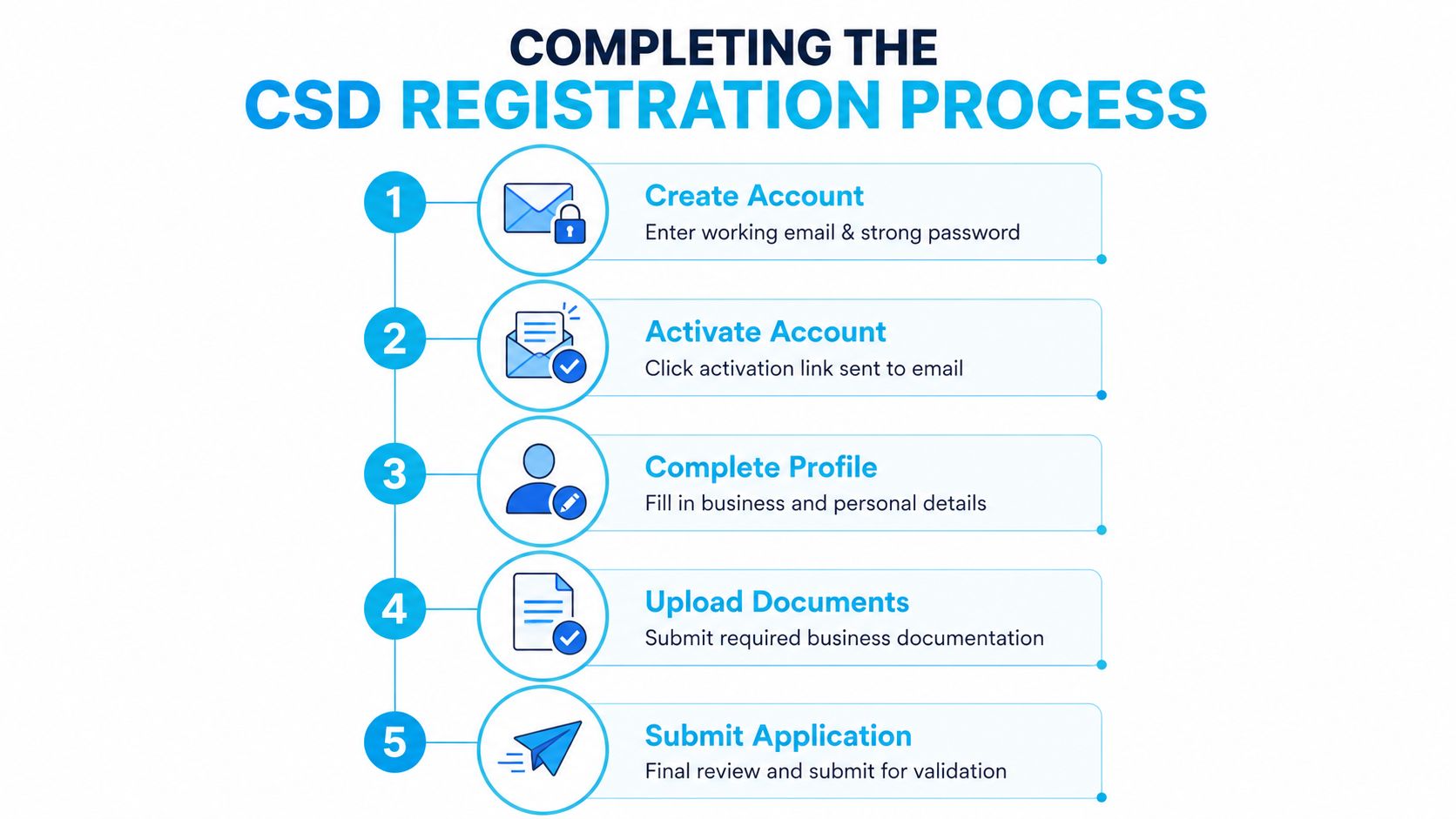
The first stage creates your CSD user account. You provide a working email address, create a password, activate the account through an emailed link, and use a cellphone number for one-time PIN verification. The second stage captures the supplier's full details and submits the profile for validation.
The registration process requires information such as:
Supplier identity: An ID number or company or trust registration number.
Contact channels: A valid email account and cellphone number for activation and OTP delivery.
Location data: Province, municipality, city, suburb, ward, and postal code.
Business information: Legal identity, tax, banking, ownership, and commodities details.
After successful registration and validation, the CSD creates an auto-generated supplier number. National Treasury guidance states that a municipal supplier number begins with the MAAA prefix, which forms part of mandatory municipal listing criteria under MFMA Circular No 81 regulations.
Treat that number as evidence of a completed validation outcome, not merely proof that you opened an account. Government entities use it in onboarding and listing workflows, so quote it only after the database confirms successful validation.
Procurement readiness also connects with financial planning. If a tender requires stock, vehicles, equipment, or working capital, the Business Loan Warrior funding strategy can help you consider funding alongside compliance.
Preparing the Information Needed to Register on CSD
The smoothest registration starts before you open the portal. CSD registration is a data-quality exercise because the system expects your identity, contact, tax, banking, and location information to form one coherent record.
Build five information blocks before you start
Legal-entity information should match your registered records. Gather the registered name, trading name, CIPC company or close corporation number, enterprise type, and VAT status. Use the legal name exactly as it appears in the underlying registration record, including punctuation and spacing where relevant.
Warning: Use the registered legal entity name, not just the trading name. If your bank account, CIPC records, and CSD profile do not reflect the same legal name, validation and payment onboarding can be delayed.
Contact and address information needs more than a street name. Prepare the physical, postal, and registered business addresses, then confirm the province, municipality, city, suburb, ward, and postal code. A business operating from a rural or shared premises should check the location fields carefully rather than choosing the closest familiar municipality.
Tax information can include your income tax reference, VAT number where applicable, and PAYE or UIF registration details. Your CSD information should agree with the tax records held by the responsible authority.
Banking details deserve a separate verification check. Confirm the account holder name, account number, branch details, and the electronic verification information with your bank. The account holder should align with the registered legal entity. A personal account or a trading name that does not match the legal record can cause avoidable problems.
Warning: Bank account name mismatches are a common CSD failure point. If the bank account holder name does not align with the CIPC legal entity name, the profile may not validate as expected.
Director or member information must be accurate for every relevant person. Prepare ID numbers, nationality, gender, and ownership information used for B-BBEE-related profiling. Do not guess or copy old information from a previous tender pack.
Special checks for multi-director companies and joint ventures
If your company has multiple directors or members, accuracy across all listed individuals matters. Every director recorded at CIPC should have valid identity details that can be verified against Home Affairs records. A mismatch in one director's details can create validation problems for the broader supplier profile.
For SMEs operating through an unincorporated joint venture (JV), procurement readiness requires additional care. Each JV partner should hold its own independent, fully validated CSD profile and supplier number. In practice, that means each participating entity should already have its own valid MAAA-numbered supplier record before the JV bid is assembled.
Where a tender allows a joint venture, buyers may still assess the compliance standing of each participating entity separately. If one partner has unresolved tax, banking, or identity issues, the JV's submission can be weakened or delayed.
Warning: A JV is not a shortcut around compliance. Each partner's CSD, tax, banking, and core registration details should be clean and tender-ready before the joint venture relies on them in a bid.
Run a pre-registration data matching check
Before you begin, compare the spelling of the business name, registration number, directors or members, tax references, address, email, cellphone number, and bank account holder name against your source documents. Keep certified or official documents accessible, but remember that the key issue is consistency, not merely having a large folder of attachments.
The CSD guidance says suppliers must keep their information complete, accurate, and up-to-date through the National Treasury CSD registration process guidance. That instruction matters because the database is intended to act as a single supplier record for procurement use.
Data matching test: If a bank official, tax official, Home Affairs verification, and company registration record would write your business name or identity details differently, resolve the difference before you submit the CSD profile.
How to Complete CSD Registration Step by Step
Use the official secure CSD portal and set aside enough uninterrupted time to capture the profile carefully. Rushing through the screens increases the chance of a spelling error, an incorrect classification, or an incomplete mandatory field.
Create your CSD user account
Create the user account with an email address that the business can reliably access. Use a strong password and store the login details in a controlled business record rather than leaving them in one person's private inbox.
The system sends an activation link to the email address. Open that link and complete the activation before moving to the next stage. If the message does not arrive, check the address entered, spam folders, and whether the mailbox is still active.
Complete identity and OTP verification
The registration process also uses a cellphone number for an OTP. You will need access to both channels, because email activation and mobile verification form part of the digital identity process.
If the business owner is registering on behalf of a company, keep the company's authority and identity information nearby. The person creating the account and the supplier entity are related, but they are not the same thing. The profile must ultimately describe the correct legal supplier.
For companies with more than one director, confirm in advance that all director details reflected in the company records are current and consistent with official identity information. It is easier to correct these issues before submission than during a tender deadline window.
Capture and submit the supplier profile
The screens generally ask you to identify the supplier type, then provide entity, address, contact, banking, tax, ownership, and industry information. Select the business structure accurately. A sole proprietor, company, trust, and individual supplier should not be presented as interchangeable categories.
Use the documents prepared earlier to complete each field:
Identify the supplier, using the correct ID or registration number.
Capture business details, including legal name and enterprise information.
Enter addresses and contacts, checking municipality and ward data.
Add banking and tax details, ensuring they match the relevant source records.
Select commodities, choosing descriptions that reflect what you sell or deliver.
Review the profile, then submit it for validation.
For owners who are still confirming the right structure for a new venture, practical guidance on sole trader registration can provide useful background, although the CSD profile must always reflect the entity you operate.
Once submitted, the CSD performs validation and, after successful registration and validation, generates the supplier number automatically. Save the confirmation and supplier number in your tender folder, accounting records, and supplier master file. You can also improve your general operating discipline with the best digital tools for a small business in South Africa, particularly tools that help control documents and renewal reminders.
Managing CSD Documents, Tax Status, and Compliance Details
Registration does not mean every supporting item has the same status. Some information is needed for the CSD to validate your record, while other documents become important because a particular tender, buyer, preference requirement, or sector rule asks for them.
Recent documentation matters. Current South African guidance highlights the importance of up-to-date banking confirmation and tax compliance information, while CSD records also include ongoing details for tax, directors or members, notifications, and commodities (CSD registration guide). That makes the profile a living compliance record rather than a certificate you create once and forget.
| Document or field | Status | Why it matters |
|---|---|---|
| Legal entity and registration details | Essential | Establishes the supplier's identity and supports validation. |
| Email address and cellphone number | Essential | Enables account activation, OTP verification, and notifications. |
| Physical and postal address | Essential | Structures the supplier's location, including municipality and ward information. |
| Tax information and compliance status | Essential for validation and procurement use | Helps buyers assess whether the supplier record is current and usable. |
| Banking information | Essential | Supports supplier verification and payment onboarding. |
| Director or member details | Essential where applicable | Connects the supplier record to the correct ownership and management information. |
| Commodity selections | Recommended and procurement-relevant | Helps describe what the business supplies and supports opportunity matching. |
| B-BBEE certificate or affidavit | Situational | May support preference or tender-specific requirements, but is not universally required for basic registration. |
| Current banking confirmation | Strongly recommended | Helps resolve account-holder mismatches and buyer onboarding questions. |
Tax clearance is increasingly represented through a Tax Compliance Status PIN, and B-BBEE documentation is recommended or situation-dependent rather than a universal prerequisite for creating a basic CSD record. The tender document remains the controlling source for what must accompany a bid.
Manual SARS tax refresh inside CSD
One of the most important compliance steps is often missed by SMEs under time pressure. If you resolve a tax issue on SARS eFiling, that change may not appear in CSD immediately.
Important tax sync warning: Fixing a tax non-compliance issue on SARS eFiling does not automatically update your CSD profile in real time. Before submitting a tender, log in to the CSD portal and manually click "Request Tax Details from SARS" so the system can refresh your tax status.
This step is especially important when your business has recently restored tax compliance, updated a tax reference, or resolved a filing issue. Do not assume the CSD record has already pulled the latest SARS result just because eFiling shows the problem is fixed.
A practical sequence is:
Resolve the underlying tax issue on SARS eFiling.
Confirm your tax position is acceptable on the SARS side.
Log into the CSD portal.
Use the "Request Tax Details from SARS" function.
Check whether the refreshed tax details now reflect correctly before relying on the profile for a tender.
When your business changes its address, bank account, contact number, directors, ownership, commodities, or tax position, update the existing profile. Do not create a second record to reflect the change. For related risk planning, SMEs can also review why professional indemnity insurance may matter when contracts require evidence of professional protection.
Common CSD Registration Mistakes That Delay Tender Readiness
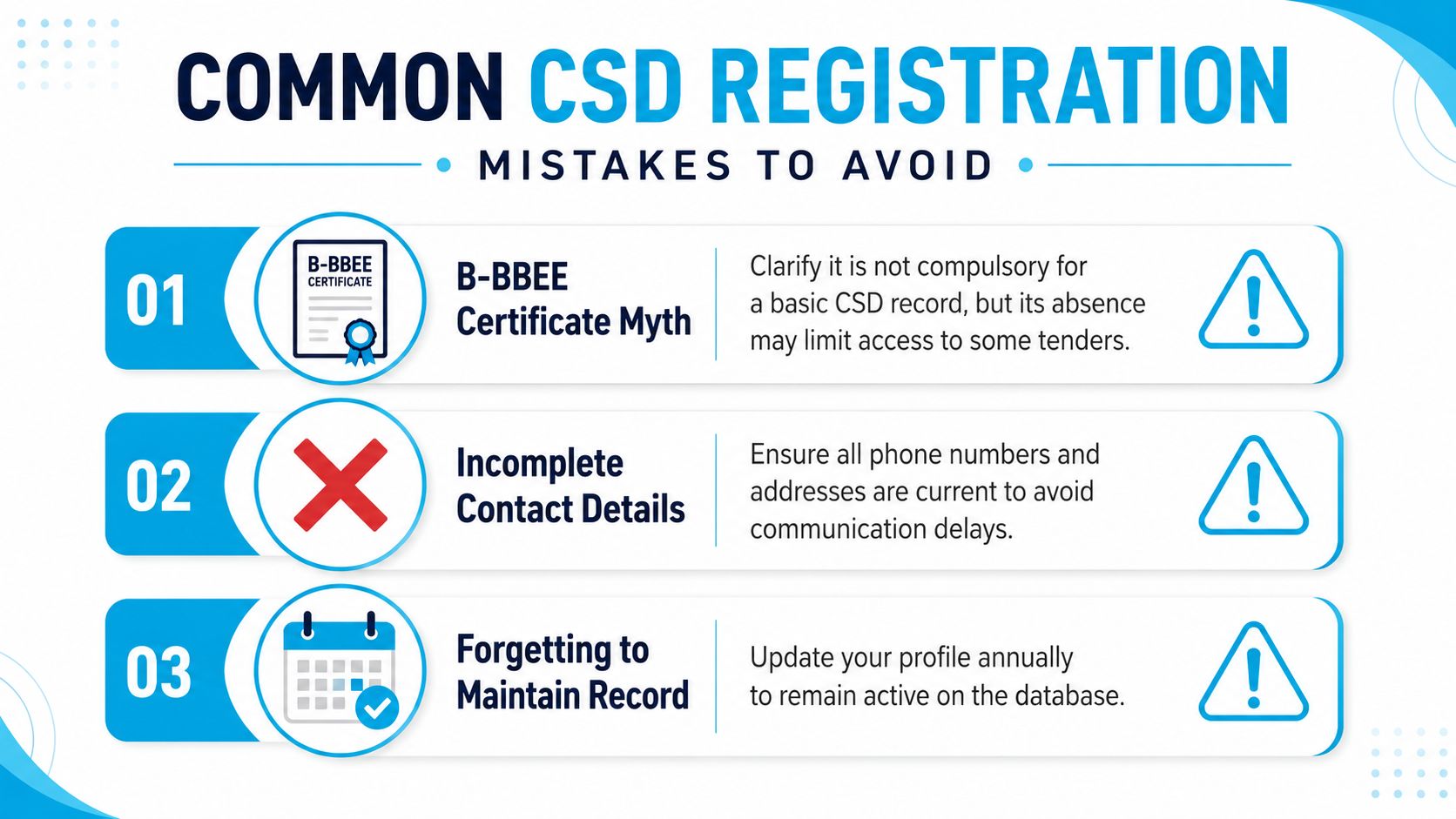
Many delays come from reasonable assumptions that are not safe in practice. B-BBEE is not compulsory for a basic CSD record, but the absence of valid supporting evidence may limit access to tenders that use preference requirements. An exempt micro-enterprise may be able to use a sworn affidavit where the tender permits it, but the bid document controls the requirement.
Tax status creates another common blockage. If your tax compliance status is inactive or non-compliant, CSD may not validate the supplier record as expected. Resolve the underlying issue through SARS first, then allow the updated information to flow through before relying on the record for a bid.
Watch for these practical errors:
Duplicate profiles: Registering the same entity under slightly different names can create conflicting supplier information.
Bank mismatches: An account name that does not match the registered legal entity can interrupt electronic verification.
Incomplete contacts: An old cellphone number or email address can prevent OTP delivery and procurement notifications.
Premature quoting: Do not place a supplier number on a tender before the database confirms successful validation.
Timing assumptions: Weekend and public holiday submissions may not produce the response time you expect, so start before a closing deadline.
Director data gaps: In multi-director entities, one incorrect ID detail can delay the wider record.
JV dependency risk: A joint venture can stall if one partner's individual CSD profile is incomplete or not fully validated.
Warning: Never open a duplicate profile just because validation is slow. First compare the source records character by character, then correct the existing profile through the proper update process.
A clean profile is easier to maintain than several partially correct records. If validation stalls, compare the source documents character by character before trying another submission.
How to Verify and Maintain Your CSD Supplier Record
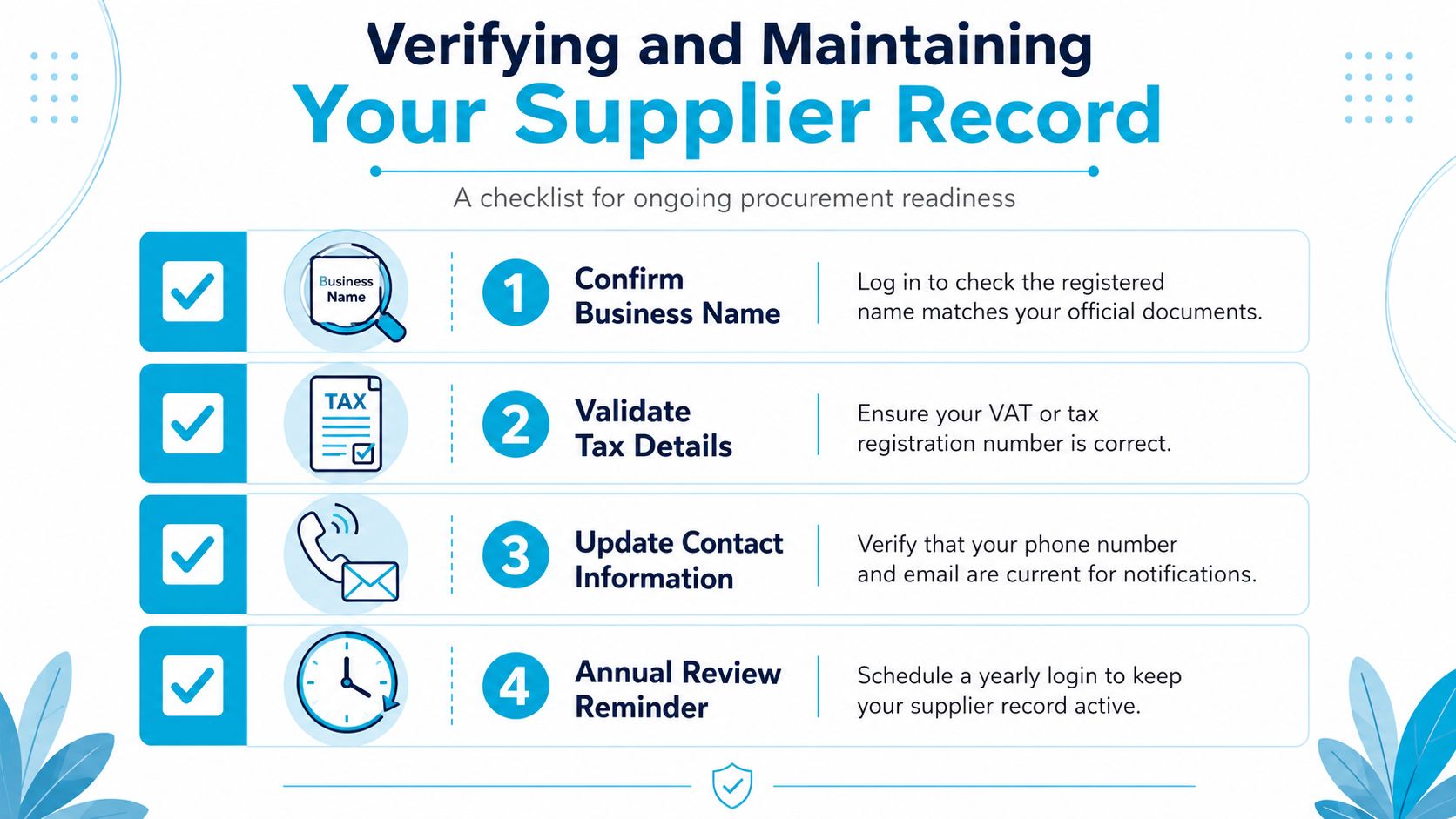
Validation is the beginning of procurement readiness. Once the profile is active, log in and check the business name, registration or identity number, tax details, contacts, physical and postal addresses, banking information, commodities, and B-BBEE status.
Save the supplier number in a controlled supplier master file and in your tender records. Keep dated copies of CSD correspondence, tax status evidence, banking confirmation, B-BBEE documents, and submitted updates. This gives you a clear trail when a buyer asks when information was changed or when a validation problem needs investigation.

Before submitting a tender, use this final check:
Compare records: Match the CSD profile against the tender's supporting documents.
Check tax sync status: If you recently fixed a SARS issue, use "Request Tax Details from SARS" inside CSD before relying on the profile.
Check expiry-sensitive information: Confirm tax and B-BBEE evidence remains acceptable for the specific bid.
Confirm contacts: Make sure officials can reach the people responsible for clarifications.
Review the existing profile: Correct errors through the official update or support process instead of registering again.
Schedule a recurring review of the record and update changes promptly. A supplier number confirms that your business has a CSD record. It does not guarantee a tender award, payment, or approval by a particular government buyer.
CSD Registration Questions South African SME Owners Ask
Does tax information stay valid permanently? No. Tax compliance information can change, so keep it current and respond to requests for updated information. If the source record is wrong, correct it with the relevant authority before asking CSD to reflect the change.
If I fix my tax status on SARS eFiling, will CSD update automatically? Not always in real time. After resolving the issue on SARS, log into CSD and click "Request Tax Details from SARS" before using the profile for a tender submission.
Do I automatically receive B-BBEE preference? No. A CSD profile is not universal proof of every preference claim. A tender may require a valid certificate, sworn affidavit, or another form of evidence, and the tender document determines what the buyer will accept.
What should I do if validation fails? Compare every character in the CSD profile with your SARS, CIPC, banking, and B-BBEE records. Correct the source record first where possible, allow the updated extract to become available, and then update the existing CSD profile. Do not create a duplicate supplier number.
How does CSD work for a joint venture? In practice, each JV partner should maintain its own validated CSD profile and supplier number. The tender rules may ask for additional JV documentation, but one partner's compliance weaknesses can still affect the combined submission.
Does the supplier number guarantee work? No. It confirms a supplier record, not a contract, payment, or award. The responsible tender official remains the right contact for submission requirements and supporting documents.
Use official National Treasury or CSD support channels when you need help. Do not share banking credentials, tax information, or identity documents with unofficial intermediaries just because they promise faster registration.
Bi-me helps South African SMEs compare suitable business insurance options online, including public liability, professional indemnity, contractors all risk, cyber liability, and other specialist covers. Visit Bi-me to explore cover matched to your business activities and keep your procurement-readiness planning aligned with your operational risks.
This is general information only and does not take into account your financial situation, needs, or specific objectives. As with any insurance, the cover will be subject to the terms, conditions, and exclusions contained in the policy wording.